Terragrunt 1.2 is a release about accessibility. Terragrunt has never been easier to use, and more compatible with the way the Terragrunt community already manages infrastructure.
Across the 1.1 series, we incrementally shipped improvements gated by experiment flags that make it easier to manage infrastructure the way that works best for you. Terragrunt now supports dynamic expansion of HCL configurations, content pulled from OCI registries, version constraints for registry modules, Azure backends, faster dependency output fetching and new capabilities for integrating AI agents to help you manage your infrastructure with confidence.
With 1.2, eleven of these experimental features graduate to general availability.
Iterate units, stacks and dependencies with expansion
The expansion block delivers one of the most requested features in Terragrunt: the ability to expand dependency, unit and stack HCL blocks using for_each and count.
For years, Terragrunt users have had the inconvenience of having to write multiple near-identical dependency blocks to codify that a unit has multiple dependencies.
dependency "east_vpc" {
  config_path = "../us-east-1/vpc"
}

dependency "west_vpc" {
  config_path = "../us-west-1/vpc"
}

inputs = {
  vpc_ids = {
    us-east-1 = dependency.east_vpc.outputs.id
    us-west-1 = dependency.west_vpc.outputs.id
  }
}
With the advent of Terragrunt Stacks, this was compounded by the fact that unit and stack blocks very naturally lent themselves to repetition, as the point of the terragrunt.stack.hcl file is to generate repeated IaC configuration on demand.
unit "east_vpc" {
  source = "github.com/acme/infrastructure-catalog//units/vpc?ref=v1.0.0"
  path   = "us-east-1/vpc"
}

unit "west_vpc" {
  source = "github.com/acme/infrastructure-catalog//units/vpc?ref=v1.0.0"
  path   = "us-west-1/vpc"
}

unit "app" {
  source = "github.com/acme/infrastructure-catalog//units/app?ref=v1.0.0"
  path   = "app"

  autoinclude {
    dependency "east_vpc" {
      config_path = unit.east_vpc.path
    }

    dependency "west_vpc" {
      config_path = unit.west_vpc.path
    }

    inputs = {
      vpc_ids = {
        us-east-1 = dependency.east_vpc.outputs.id
        us-west-1 = dependency.west_vpc.outputs.id
      }
    }
  }
}
The Terragrunt community has long asked for the for_each and count it already uses in OpenTofu/Terraform. The expansion block brings both to dependency, unit and stack blocks.
locals {
  regions = toset(["us-east-1", "us-west-1"])
}

unit "vpc" {
  expansion {
    for_each = local.regions
  }

  source = "github.com/acme/infrastructure-catalog//units/vpc?ref=v1.0.0"
  path   = "${each.key}/vpc"
}

unit "app" {
  source = "github.com/acme/infrastructure-catalog//units/app?ref=v1.0.0"
  path   = "app"

  autoinclude {
    dependency "vpc" {
      expansion {
        for_each = local.regions
      }

      config_path = unit.vpc[each.key].path
    }

    inputs = {
      vpc_ids = { for region, vpc in dependency.vpc : region => vpc.outputs.id }
    }
  }
}
count and for_each have also long done a second job in OpenTofu/Terraform. Until recently, the only way to make resources conditional was to abuse the count or for_each attribute like this:
resource "aws_s3_bucket" "bucket" {
  bucket = "maybe-present-bucket"

  count = var.enabled ? 1 : 0
}

output "bucket_name" {
  value = var.enabled ? aws_s3_bucket.bucket[0].id : null
}
If you're using Terragrunt with OpenTofu (and it would be weird if you weren't), you're probably a fan of the enabled attribute supported in OpenTofu.
resource "aws_s3_bucket" "bucket" {
  bucket = "maybe-present-bucket"

  lifecycle {
    enabled = var.enabled
  }
}

output "bucket_name" {
  value = var.enabled ? aws_s3_bucket.bucket.id : null
}
It's a much cleaner design for conditional resources, and more clearly communicates the intent of the author when working on IaC. Diógenes Fernandes (@diofeher), an OpenTofu engineer sponsored by Gruntwork, submitted the RFC to introduce the attribute in OpenTofu and developed the feature! It was important to us that Terragrunt have similar support for enabled.
locals {
  regions = toset(["us-east-1", "us-west-1"])
}

unit "vpc" {
  expansion {
    for_each = local.regions
  }

  enabled = values.enabled

  source = "github.com/acme/infrastructure-catalog//units/vpc?ref=v1.0.0"
  path   = "${each.key}/vpc"
}
As that example shows, you can mix and match expansion with enabled!
Special thanks to Ross Strickland (@pseudomorph) for writing up the RFC that lead to the expansion block and working with Terragrunt maintainers on the design and implementation of this feature!
To learn more about expansion, read the docs.
Open Container Initiative Source Support
Recent changes to the infrastructure landscape have not been kind to the services we depend on for stable and reliable delivery of software artifacts for IaC. Add the growing risk of supply chain attacks, and more platform teams want greater control over the provenance of their artifacts.
An increasingly popular way to get that control is to use Open Container Initiative (OCI) registries. They're a convenient, widely supported mechanism for distributing artifacts, and they're easy to self-host in environments that need to avoid accessing artifacts over the public internet.
OpenTofu introduced support for fetching modules from OCI registries in release v1.10.0. The Terragrunt community has been a big fan of this, and has asked us to follow suit. We're pleased to announce that we have!
# terragrunt.hcl
terraform {
  source = "oci://ghcr.io/acme/infrastructure-catalog//modules/vpc?tag=v1.0.0"
}
oci:// sources work just like they do in OpenTofu, including the same credential resolution. If you have OCI configurations set up for OpenTofu, you can start using oci:// sources in your units with no extra setup.
OCI sources aren't just supported in unit configurations. They're also supported in stacks!
# terragrunt.stack.hcl
unit "vpc" {
  source = "oci://ghcr.io/acme/infrastructure-catalog//units/vpc?tag=v1.0.0"
  path   = "vpc"
}
To learn more about OCI support in Terragrunt, read the docs.
Faster output fetching
For certain supported backends (S3, GCS and Azure), Terragrunt now bypasses calling tofu/terraform output -json when fetching dependency outputs. This circumvents the overhead of calling tofu/terraform init to download providers and the overhead OpenTofu/Terraform incurs when loading providers into memory for tofu/terraform output.
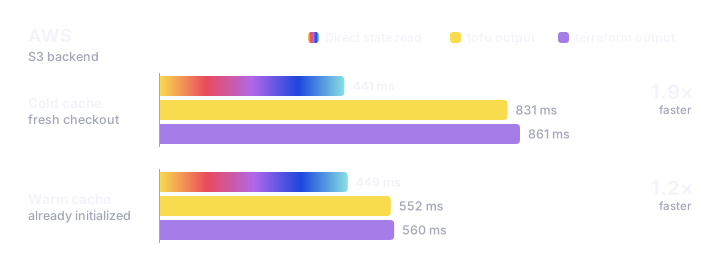
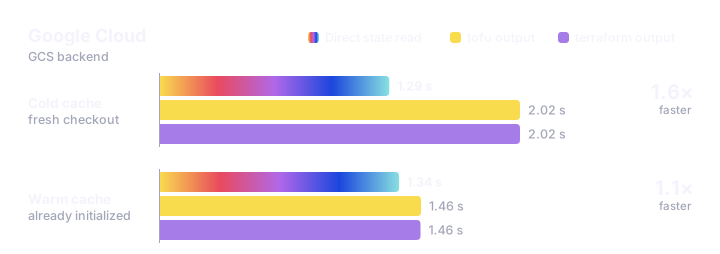
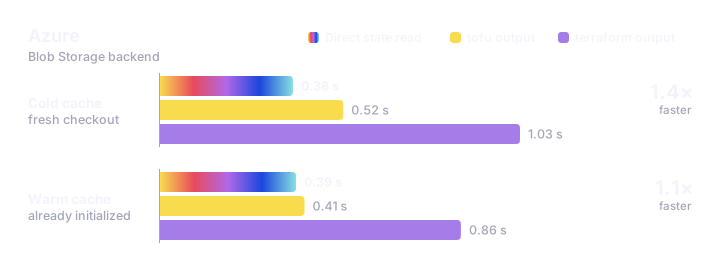
When outputs cannot be loaded in this manner (e.g. because the backend isn’t supported), Terragrunt automatically degrades output fetching to standard tofu/terraform output -json calls. You can also explicitly turn off this optimization using the new --no-dependency-fetch-output-from-state flag. As you can see, you can generally expect better output fetching performance with leveraging OpenTofu than with Terraform when you can’t use this optimization.
This performance improvement scales with the size of your IaC estate. The more outputs you have to fetch to complete a run, the more you will benefit from this feature.
repository {
  env {
    TG_DEPENDENCY_FETCH_OUTPUT_FROM_STATE = "true"
  }
}
Azure backend fully supported
Joining the ranks of S3 and GCS backends, Azure Blob Storage is now a fully supported Terragrunt state backend.
When using the backend bootstrap command or the --backend-bootstrap flag, Terragrunt will now automatically provision the resource group, storage account and blob container for azurerm backend use in OpenTofu/Terraform just-in-time as state storage. As shown above, this also means that you can expect significant performance gains out of the box as Terragrunt fetches outputs directly from Azure Blob Storage, bypassing tofu/terraform output -json by default.
Keep discovery bounded
Some operations, like finding the dependents of a unit, make Terragrunt parse every configuration from the working directory up to the repository root, because any of them might depend on that unit. That causes trouble in a repository like this one, where a catalog sits next to live infrastructure:
$ terragrunt list --tree
.
├── catalog
│   ╰── units
│       ├── app
│       ╰── vpc
╰── live
    ├── app
    ╰── vpc
Running live/vpc and its dependents parses everything under catalog too, and the run fails:
$ terragrunt run --filter '...live/vpc' -- plan
ERROR  Error: Unknown variable
ERROR    on catalog/units/app/terragrunt.hcl line 2, in dependency "vpc":
ERROR     2:   config_path = values.vpc_path
ERROR  There is no variable named "values".
You can now set a boundary that tells Terragrunt to stop at live. The new --discovery-boundary flag sets one for every --filter on the command:
terragrunt run --filter '...live/vpc' --discovery-boundary live -- plan
A (dir) operand in a graph expression sets one for that expression alone:
terragrunt run --filter '(live)...live/vpc' -- plan
On a large estate, a boundary saves the time spent parsing directories you know are unrelated. In a monorepo like this one, it also prevents the failure above. Catalog configurations are templates, and many of them can't be parsed until they've been generated into a stack.
Bounded discovery was gated behind the bounded-discovery experiment, and is now generally available. To learn more, read the docs.
# .gruntwork/pipelines.hcl
repository {
  env {
    TG_DISCOVERY_BOUNDARY = "live"
  }
}
Generated files deduplicated in the CAS
The Content Addressable Store (CAS) now stores the files that generate blocks generate. A block like this one in your root.hcl generates a single file in the CAS, hard-linked into every unit that includes it:
# root.hcl

generate "provider" {
  path      = "provider.tf"
  if_exists = "overwrite_terragrunt"
  contents  = <<-EOF
    provider "aws" {
      region = "us-east-1"
    }
  EOF
}
A hundred units that include it share one provider.tf on disk.
Generated files are now read-only by default. That matches how they're meant to be used, but a hook or script that edits a generated file in place will fail with a permission error. Set mutable = true on that generate block to give each unit a writable copy:
# root.hcl

generate "provider" {
  path      = "provider.tf"
  if_exists = "overwrite_terragrunt"
  mutable   = true
  contents  = <<-EOF
    provider "aws" {
      region = "us-east-1"
    }
  EOF
}
On filesystems that support reflinks, like APFS on macOS, a mutable file still saves disk space, because the filesystem only copies the parts you edit. Passing --no-cas turns the CAS off for a run.
This was gated behind the mutable-generate experiment, and is now generally available. To learn more, read the docs.
Agents can now access your catalog
Platform teams use the Terragrunt Catalog to offer self-service infrastructure. They curate a set of vetted patterns, and colleagues browse and scaffold from them in the catalog TUI, including colleagues who wouldn't be comfortable writing infrastructure configurations from scratch.
With the rise of agentic workflows, we've heard that agents have been feeling left out. They usually don't have an interactive terminal, so they couldn't use the catalog to scaffold infrastructure from those same patterns.
As of v1.2, they can. The catalog command now accepts a --format flag that writes the contents of your catalog to stdout as JSONL or Markdown. When Terragrunt detects that it isn't running in an interactive terminal, it writes JSONL by default, so agentic tools get a working catalog out of the box.
$ terragrunt catalog --format jsonl | head -n 1 | jq
{
  "kind": "module",
  "title": "DynamoDB Table Module",
  "description": "This is an example OpenTofu/Terraform module that deploys a DynamoDB Table. See the root README for instructions on how to provision this module.",
  "source": "github.com/gruntwork-io/terragrunt-infrastructure-catalog-example",
  "dir": "modules/dynamodb-table",
  "version": "v1.1.1",
  "url": "https://github.com/gruntwork-io/terragrunt-infrastructure-catalog-example/tree/main/modules/dynamodb-table",
  "component_source": "git::https://github.com/gruntwork-io/terragrunt-infrastructure-catalog-example.git//modules/dynamodb-table",
  "doc": "# DynamoDB Table Module\n\nThis is an example OpenTofu/Terraform module that deploys a [DynamoDB Table](https://aws.amazon.com/dynamodb/)...\n"
}
Piping the command also takes it out of an interactive terminal, so tools like jq can read your catalog with no flag at all:
$ terragrunt catalog | jq -c '{kind, title, dir}'
{"kind":"module","title":"DynamoDB Table Module","dir":"modules/dynamodb-table"}
{"kind":"module","title":"ASG with ALB Module","dir":"modules/ec2-asg-service"}
{"kind":"module","title":"ECR Repository Module","dir":"modules/ecr-repository"}
{"kind":"template","title":"ECS Fargate Service Module","dir":"modules/ecs-fargate-service"}
{"kind":"module","title":"IAM Role Module","dir":"modules/iam-role"}
{"kind":"module","title":"Lambda Service Module","dir":"modules/lambda-service"}
{"kind":"module","title":"MySQL on RDS Module","dir":"modules/mysql"}
{"kind":"module","title":"S3 Bucket Module","dir":"modules/s3-bucket"}
{"kind":"module","title":"Security Group (SG) Module","dir":"modules/sg"}
{"kind":"module","title":"Security Group (SG) Rule Module","dir":"modules/sg-rule"}
{"kind":"stack","title":"ec2-asg-stateful-service","dir":"stacks/ec2-asg-stateful-service"}
This was gated behind the catalog-format experiment, and is now generally available. To learn more, read the docs.
Two New MCP Servers
We’ve been contemplating the right way to responsibly build in integrations with new agentic tools without giving platform engineers footguns that put their infrastructure at undue risk. To that end, two new MCP servers are now available, depending on what you are looking to get out of MCP integration in Terragrunt.
The Terragrunt Docs MCP Server
LLMs learn Terragrunt from whatever is public on the internet. A lot of that is stale, so they can confidently give you incorrect information based on how Terragrunt worked years ago. Terragrunt is also improving faster than ever, so even newer models can miss the latest features, or spend time and tokens double-checking what they know.
Terragrunt maintainers use agents in our software development lifecycle, and have been gathering feedback from colleagues and members of the community on how agents work with Terragrunt in practice. Here are some things that we’ve noticed:
- Terragrunt’s relatively long history means that agents have a pretty good idea of what Terragrunt is, how to author configurations that solve infrastructure problems, and how to use the Terragrunt CLI to make infrastructure changes.
- LLMs (especially smaller, faster, cheaper models) can confidently recommend deprecated or removed functionality (like the
run-allcommand) and don’t think to check for more recent functionality (like the--filterflag). They also don’t do a great job of recommending steps to help you modernize your usage of Terragrunt. - Flags, commands, configurations, and schemas can be hallucinated by LLMs, and that can result in dangerously incorrect guidance for managing infrastructure safely.
To help mitigate these issues, we’ve provisioned an MCP server that regularly ingests Terragrunt documentation, and serves that documentation to agents based on the version of Terragrunt that you are using. The server is read-only and doesn’t get access to your code, credentials, or infrastructure.
In addition to documentation for any version of Terragrunt from v0.80 onward, the server also provides tools to help you modernize your usage of Terragrunt for better ergonomics and performance. It also has some curated example patterns of Terragrunt usage to help you solve infrastructure problems idiomatically. If you are using an older Terragrunt version (especially if you are using a version older than 1.0), or have CI/CD scripts set up to integrate with legacy CLI flags, it can help you modernize your usage of Terragrunt.
Installation instructions for the MCP server can be found here. To learn more about what the server can do, ask your agent about it!
Note that while this MCP server is currently free for use with no authentication, this might change in the future. We’re actively evaluating the costs of keeping the server running, and our ability to ensure high availability without requiring authenticated sessions. This server is available as a public beta with no availability guarantee.
The mcp Command
The docs server can tell an agent how Terragrunt works in general. It can't tell an agent anything about your infrastructure. For that, Terragrunt now has an experimental mcp command, which runs an MCP server locally and gives an agent tools for inspecting and working with your Terragrunt configurations and the infrastructure they describe.
Agents talk to the server over stdin/stdout. It uses functionality built into Terragrunt to describe your infrastructure estate: the components in it, the relationships between them, whether they are valid and the order they'd run in. Agents get that as structured data, so they don't have to parse CLI output to reason about your configurations.
The server is deny-by-default. Until you grant them, it has none of the following capabilities:
exec: The ability to run thetofu,terraformandgitprocesses that Terragrunt starts on its own.http: The ability to make network requests.sops: The ability to decrypt files encrypted with SOPS.env: The ability to read environment variables.
You typically won't run the mcp command yourself. Instead, you configure your agent to launch it, usually through a .mcp.json file:
{
  "mcpServers": {
    "terragrunt": {
      "command": "terragrunt",
      "args": ["mcp", "--working-dir", "/path/to/estate"],
      "env": {
        "TG_EXPERIMENT": "mcp-command"
      }
    }
  }
}
This setup grants none of those capabilities, so the server can only read and reason about the configurations in your estate. The directory it is launched in is also the boundary of where it can run tools, and it refuses any tool call that targets a directory outside it. Where a missing capability stops the server from doing what Terragrunt normally would, it substitutes a stand-in, such as mock_outputs for a dependency output it couldn't fetch, and lists each substitution in a degraded field so your agent knows how and why the response was affected.
If you trust the agent that's working with your configurations, you can grant capabilities one at a time with the --allow flag. This example grants exec, http and env:
{
  "mcpServers": {
    "terragrunt": {
      "command": "terragrunt",
      "args": [
        "mcp",
        "--working-dir", "/path/to/estate",
        "--allow=exec",
        "--allow=http",
        "--allow=env"
      ],
      "env": {
        "TG_EXPERIMENT": "mcp-command"
      }
    }
  }
}
This lets the server run plans, but not applies or destroys.
The apply and destroy tools don't exist in the server at all unless you pass the appropriately scary-sounding --dangerously-allow-apply flag. Launch that server in a directory you are willing to have applied by your agent:
{
  "mcpServers": {
    "terragrunt-throwaway": {
      "command": "terragrunt",
      "args": [
        "mcp",
        "--working-dir", "/path/to/estate/throwaway",
        "--allow=exec",
        "--allow=http",
        "--allow=env",
        "--dangerously-allow-apply"
      ],
      "env": {
        "TG_EXPERIMENT": "mcp-command"
      }
    }
  }
}
The server is designed to be as safe as it can be while still being useful, with escape hatches for operators who know what they're doing and accept additional risk. Even with --dangerously-allow-apply, it asks the person running the agent to approve the units it is going to run before it applies or destroys anything, and it refuses a client that has no way to ask the operator. It also won’t run any run_cmd commands by default, requiring you to explicitly allow-list the commands you want to trust the server to run in addition to tofu, git, etc. using a separate --allow-cmd flag.
These restrictions are not a sandbox. They limit what this server's tools do, and nothing else. An agent that can run shell commands can still run terragrunt run --all apply itself, with your credentials. LLMs are non-deterministic, so only give an agent access to infrastructure you are willing to lose.
To learn more about this command, read the docs.
Smaller changes
This is a big release. Here are some smaller changes we’re still excited about.
Vendored OpenTofu HCL functions
Terragrunt's built-in HCL functions now track OpenTofu 1.13. That adds:
templatestringcidrcontainsbase64gunzipurldecodeissensitive- The
assume*prefixed functions introduced in OpenTofu 1.13
To get there, we dropped the hashicorp/terraform v0.15.3 dependency that has been in Terragrunt for five years, and vendored OpenTofu's implementations of these functions instead. New OpenTofu functions will reach Terragrunt as they are released.
File functions count as reads
When using the following HCL functions in Terragrunt configurations, you no longer need to explicitly wrap their parameters with mark_as_read for the files they read to be registered as read in reading-based filter expressions:
filetemplatefilefilesetfileexists- The
file*hash functions, such asfilesha256
The vendored functions above made this possible: Terragrunt now records each file they read. You still need mark_as_read for a file that is only read in OpenTofu configurations, such as one passed to a module as an input, or one that a run_cmd script reads.
Runtime profiles
Terragrunt can now profile both itself and OpenTofu, writing profiles in Go's pprof format that you can inspect with go tool pprof. Use the --profile-dir flag to collect a CPU, memory and goroutine profile for a Terragrunt run, and a CPU profile for each OpenTofu process Terragrunt starts. The per-process profiles profiles need OpenTofu 1.11 or later, and only OpenTofu is supported, not Terraform.
Attach them to a performance bug report to help us find where a slow run spends its time.
S3 account regional namespace buckets are now supported
An account regional namespace is a part of the S3 bucket namespace that only your account can create buckets in, so nobody else can take those names. Bucket names in it end with -<account id>-<region>-an. When the bucket name in your S3 backend configuration ends that way, Terragrunt creates the bucket in the account regional namespace:
# root.hcl
remote_state {
  backend = "s3"
  config = {
    bucket = "my-tofu-state-111122223333-us-east-1-an"
    key    = "${path_relative_to_include()}/tofu.tfstate"
    region = "us-east-1"
  }
}
There is no setting required to enable this. accesslogging_bucket_name is read the same way.
Before you upgrade
All the guarantees made in 1.0 Guarantees are still observed with Terragrunt v1.2. A few changes alter existing behavior, though, so read these before you upgrade.
base64gzip() returns new bytes
base64gzip() now returns what Go 1.27’s gzip encoder generates. Terragrunt v1.1.5 kept the older output and warned that it was legacy behavior. The new output decompresses to the same content, but a resource that compares the encoded string can plan a replacement on its first run after you upgrade. One reported example is an aws_instance with user_data_base64 set from base64gzip() and user_data_replace_on_change set to true.
We recommend moving to the new output. Plan after you upgrade, review any replacements it shows, and apply them when a replacement is convenient. After that one apply, your state matches what base64gzip() returns and later plans are clean.
If you can't take a replacement yet, the base64gzip_compat() HCL function keeps the old output in the meantime. Treat it as a stopgap: it is behind the base64gzip-compat experiment, and the function may be renamed or removed in a future release.
S3 state buckets no longer get the RootAccess policy statement
Terragrunt no longer adds the RootAccess statement to the bucket policy of new S3 state buckets by default. That statement granted s3:* to arn:aws:iam::<account-id>:root, which isn’t necessary for the vast majority of users. The new enable_bucket_root_access attribute restores this policy if you relied on the permissions it granted.
Existing buckets keep the RootAccess statement if they already have it. The state backend docs cover how to remove it yourself.
The skip_bucket_root_access attribute is now deprecated. Terragrunt still accepts it and warns when it is set, and the skip-bucket-root-access strict control turns that warning into an error.
S3 access log delivery permissions is granted with a bucket policy
S3 disables ACLs on new buckets by default, and a bucket with ACLs disabled rejects the ACL grant Terragrunt used to write so that a logging bucket could accept logs. Terragrunt now creates logging buckets with ACLs disabled, and grants log delivery through a bucket policy that allows s3:PutObject for the logging.s3.amazonaws.com service principal. Logging buckets that already exist keep the permissions they have.
The skip_accesslogging_bucket_acl attribute is now deprecated and has no effect. If you set it to work around an AccessControlListNotSupported failure, drop it. Terragrunt warns when it is set, and the skip-accesslogging-bucket-acl strict control turns that warning into an error. Set the new skip_accesslogging_bucket_policy attribute if you explicitly grant log delivery permissions yourself.
Generated files are read-only by default
Files written by generate blocks are now read-only, so a hook or script that edits one in place will fail with a permission error. Set mutable = true on the block to get a writable copy, as described in the CAS section above and in the docs.
Still cooking
Eleven experiments graduated, and more are in progress. Here are a few worth trying, each enabled with --experiment <name>:
- tg-login: Gruntwork Developer Portal sign-in from the Terragrunt CLI. This enables CLI integration with Gruntwork Developer Portal.
- offline-cas: Run the CAS offline in latency-sensitive or air-gapped environments, resolving sources it has already fetched without contacting a remote.
- browse-tui: Discover configurations interactively via a TUI using the
browsecommand. - hook-context-env: Extra
TG_CTX_*environment variables for hook context. - otel-logs: Export Terragrunt logs as an OpenTelemetry logs signal.
- slow-task-reporting: Show a progress spinner when operations take longer than a second.
If you try any of these, the discussion threads linked from the docs are how you can share your feedback to encourage prioritization and graduation to general availability.
Upgrading
To upgrade to Terragrunt 1.2, follow the instructions in the install docs or run the install script:
curl -sSfL --proto '=https' --tlsv1.2 https://terragrunt.com/install | bash
If you were manually setting any of the following experiments, you no longer need to set them:
azure-backendblock-iterationbounded-discoverycatalog-formatdependency-fetch-output-from-statemutable-generateocioptional-dependency-outputsoptional-hooksprofilingversion-attribute
Thank you to everyone who ran these experiments early and filed the feedback that got them here.



-
No-nonsense DevOps insights
- Expert guidance
-
Latest trends on IaC, automation, and DevOps
-
Real-world best practices