With the release of Terragrunt 1.0, the release cadence of Terragrunt is deliberately going to slow down. Our goal is to have increased stability in every new release. We won't be shipping new features without user testing, and we want to be very careful about accidental breaking changes, or introducing features with a contract that we'd have to maintain with difficulty for the full lifecycle of 1.0. Stability is a promise we intend to keep.
But there's a well-known DevOps principle at play here: if you want to release safely, release frequently. Slowing down stable releases doesn't mean slowing down the feedback loop. It means we need separate channels that move faster, outside the main releases visible on GitHub, so that users don't confuse them with the stability guarantees of a versioned release.
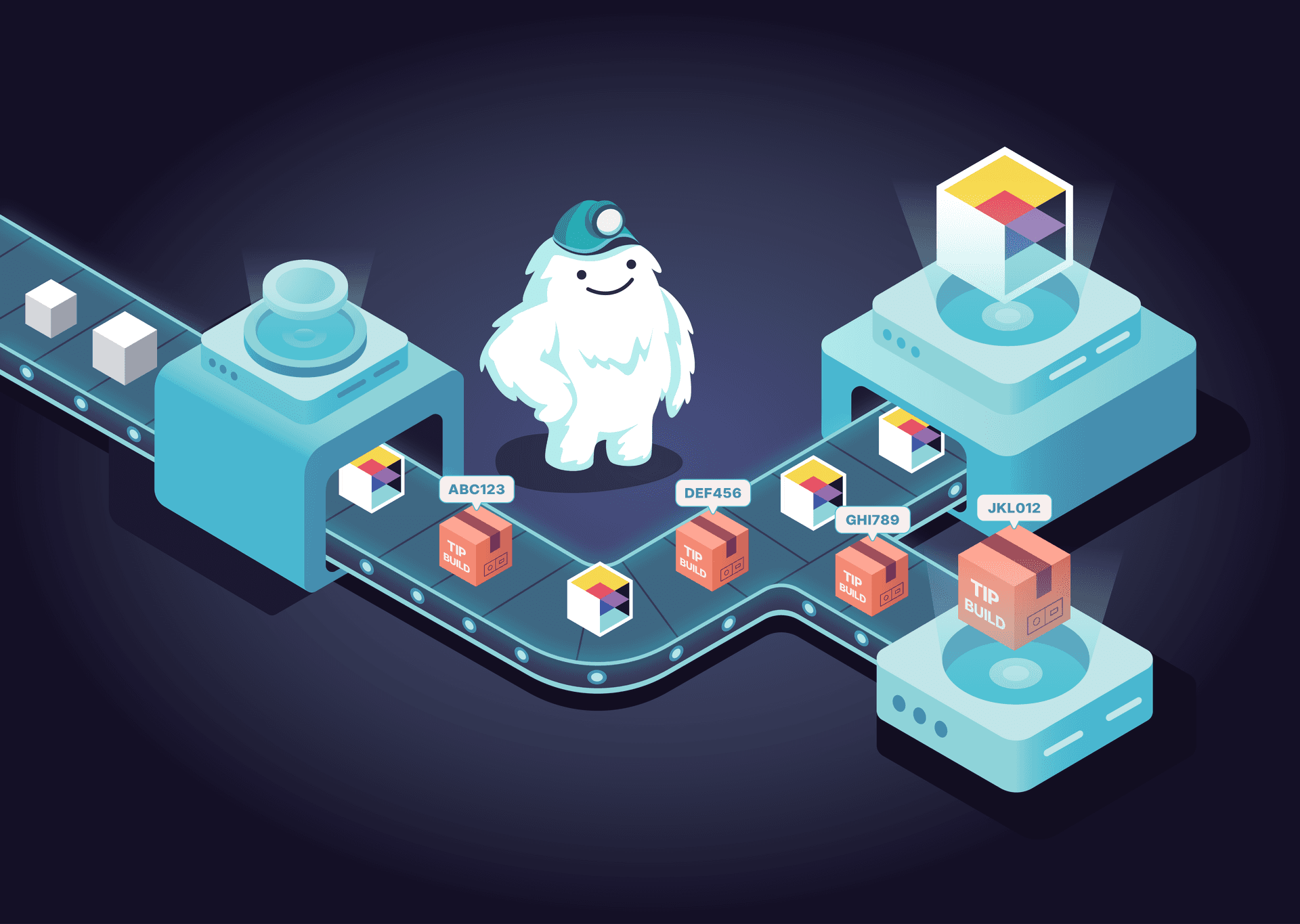
That's why we built tip builds. Every successful CI run on main now produces signed, platform-specific binaries available at builds.terragrunt.com within minutes of a commit landing.
What Are Tip Builds?
Tip builds are automatically produced binaries from the latest successful CI run on Terragrunt's main branch. They represent the "tip" of the development branch, the most recent state of the code at any given moment.
Each tip build is tied to an exact commit SHA. They're available for all supported platforms (linux, darwin, and windows across amd64, arm64, and 386 architectures), packaged as .tar.gz archives.
Tip builds are signed using the same process as official releases:
- SHA256SUMS for checksum verification
- GPG signatures (
SHA256SUMS.gpgsig) - Sigstore/Cosign signatures (
SHA256SUMS.sigstore.json)
There are a few important differences between tip builds and stable releases:
- Tip builds are bleeding-edge. They may contain incomplete features, work-in-progress changes, or regressions that haven't been caught yet.
- There is no retention guarantee. Tip builds may be reclaimed at any time to reduce hosting costs. Don't depend on a specific tip build being available indefinitely.
- The asset set is reduced. Windows and macOS binaries in tip builds are not code-signed the way they are in full releases.
In short: tip builds are for testing and validation. Stable releases are for production.
Why We Built This
Shortening the Feedback Loop
The primary motivation is speed. Before tip builds, the time between a change landing on main and a user being able to validate it in their own environment was bounded by the release cycle. That's too slow. With tip builds, a contributor can land a fix and point an issue reporter to a downloadable binary the same day, often within minutes. The feedback loop goes from days to however long CI takes. Users can verify bug fixes and test new features before a release is cut, while the changes are still fresh and the context is still in everyone's heads.
Reducing Friction
Most Terragrunt users spend their time in HCL and YAML, not Go. They shouldn't need a Go toolchain or know how to build a Go project from source just to verify a bug fix. Tip builds remove that barrier entirely. Testing a fix or a new feature is a single curl command. No build tools, no dependencies.
Bisecting Regressions
Because every commit on main produces a build, tip builds also make it possible to bisect regressions. If you know that something works in v1.0.1 but is broken in v1.0.2, you can binary search the commits between those two releases, downloading the tip build for each, until you find the exact commit that introduced the problem. No Go toolchain, no building from source, just curl and a test case.
Confidence in Releases
This is the one that matters most to us. When users can test changes in their real environments before a release, the release itself becomes routine. More eyes on pre-release code means fewer surprises at release time.
How to Use Tip Builds
Here's the full flow, from downloading a tip build to running it.
Fetching the Latest Tip Build
To download the latest tip build for your platform:
curl -sL -o terragrunt_linux_amd64.tar.gz \
  "https://builds.terragrunt.com/api/v1/tip/latest/download?os=linux&arch=amd64"
Replace linux and amd64 with your OS and architecture as needed. Supported values:
If you want to inspect the build metadata before downloading (the commit SHA, available assets, and build status), query the metadata endpoint:
curl -s https://builds.terragrunt.com/api/v1/tip/latest | jq .
This returns JSON with the commit SHA, a list of asset URLs, and the build status:
{
  "ref": "LATEST",
  "commit": "abc123def456",
  "created_at": "2026-04-13T10:30:00Z",
  "assets": [
    "https://builds.terragrunt.com/tip/abc123/terragrunt_linux_amd64.tar.gz",
    "https://builds.terragrunt.com/tip/abc123/terragrunt_darwin_arm64.tar.gz",
    "https://builds.terragrunt.com/tip/abc123/SHA256SUMS",
    "..."
  ],
  "status": "available"
}
Fetching a Specific Commit
If someone tells you "try commit abc123def456, it has the fix", you can download that exact build:
curl -sL -o terragrunt_linux_amd64.tar.gz \
  "https://builds.terragrunt.com/api/v1/tip/abc123def456/download?os=linux&arch=amd64"
The metadata endpoint works the same way:
curl -s https://builds.terragrunt.com/api/v1/tip/abc123def456 | jq .
Verifying the Download
Tip builds are signed, and you should verify them. Download the checksums and signature files using the filename query parameter:
# Download checksums
curl -sL -o SHA256SUMS \
  "https://builds.terragrunt.com/api/v1/tip/latest/download?filename=SHA256SUMS"

# Verify the checksum
# On Linux:
sha256sum -c SHA256SUMS --ignore-missing

# On macOS:
shasum -a 256 -c SHA256SUMS --ignore-missing
For stronger verification, you can validate the GPG signature:
# Download the GPG signature
curl -sL -o SHA256SUMS.gpgsig \
  "https://builds.terragrunt.com/api/v1/tip/latest/download?filename=SHA256SUMS.gpgsig"

# Import the Gruntwork public key and verify
curl -s https://gruntwork.io/.well-known/pgp-key.txt | gpg --import
gpg --verify SHA256SUMS.gpgsig SHA256SUMS
Or verify using Cosign:
# Download the Sigstore bundle
curl -sL -o SHA256SUMS.sigstore.json \
  "https://builds.terragrunt.com/api/v1/tip/latest/download?filename=SHA256SUMS.sigstore.json"

# Verify with Cosign
cosign verify-blob SHA256SUMS \
  --bundle SHA256SUMS.sigstore.json \
  --certificate-oidc-issuer https://token.actions.githubusercontent.com \
  --certificate-identity-regexp "github.com/gruntwork-io/terragrunt"
Putting It All Together
For convenience scripts that do all of this out of the box, check out the Terragrunt installation docs.
A Few Things to Keep in Mind
Tip builds are not available via package managers. Homebrew, Chocolatey, and other package managers only distribute stable releases. Tip builds are direct-download only from the builds API.
Tip builds are not intended for production usage. Use stable releases from the GitHub releases page for anything you run in production. Tip builds are for testing and validation.
How It Works Under the Hood
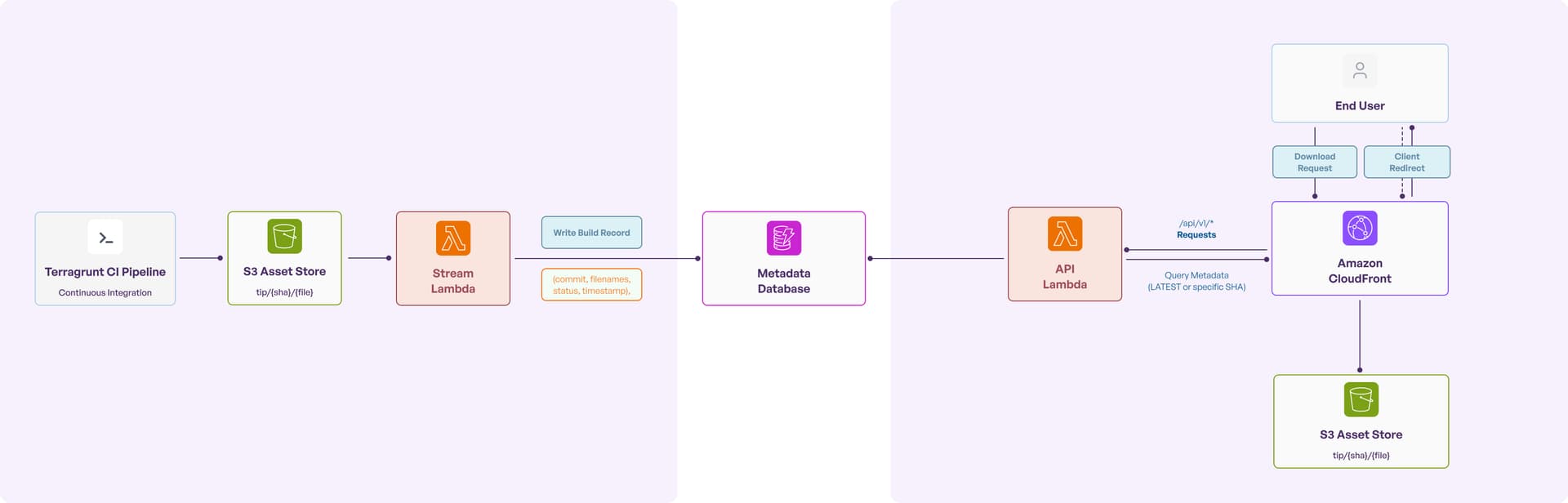
The entire system is serverless, running on AWS with minimal operational overhead.
Build Ingestion
When Terragrunt's CI pipeline produces a new set of binaries, here's what happens:
- CI uploads the platform-specific binaries, checksums, and signature files to an S3 bucket under the key pattern
tip/{commit_sha}/{filename}. - An S3 event notification triggers a Stream Lambda function.
- The Stream Lambda parses the S3 key, extracts the commit ref and filename, and writes a build record to DynamoDB, storing the ref, the list of available filenames, the build status, and a timestamp.
- A special
LATESTpointer record in DynamoDB is updated to point to the newest build. - If the Lambda fails to process an event, it's routed to an SQS dead letter queue so we can replay it later.
Serving Downloads
When a user requests a download:
- The request hits CloudFront, which provides global edge caching and TLS termination.
- API requests (anything under
/api/v1/*) are routed to an API Lambda function. - The API Lambda queries DynamoDB for build metadata, either the
LATESTrecord or a record for a specific commit SHA. - The Lambda returns a 302 redirect pointing to the asset URL on CloudFront.
- CloudFront serves the binary directly from S3. Older builds are cached aggressively (up to a year), while fresh builds bypass the cache to ensure users always get the latest artifacts.
Why These Choices?
Rust for the Lambdas. Both Lambda functions are written in Rust, compiled for ARM64 Graviton processors. The result is sub-second cold starts and a memory footprint under 128MB. The entire compute layer runs on minimal resources.
Serverless architecture. No servers to maintain, pay-per-use pricing, automatic scaling to zero. The system handles no traffic and spike traffic equally well, which is what you want for a build distribution service with unpredictable load patterns.
CloudFront + S3. Global binary distribution without managing any download infrastructure.
DynamoDB. Single-digit millisecond lookups for build metadata, with the simplicity of a key-value store. The access pattern ("look up the latest build" or "look up a build by commit SHA") maps directly to a key-value lookup.
What's Next
Tip builds are live today at builds.terragrunt.com. We encourage you to try them out, especially if you've reported an issue or you're eager to test an upcoming feature before it ships in a stable release.
For Terragrunt Enterprise Support customers, tip builds open up an even tighter collaboration between you and Gruntwork. When we're working on a fix or feature that matters to your environment, we can cut a test build for you to validate against your infrastructure before the change ships in a stable release. This is especially useful for large-scale enterprise estates where a change that looks fine in CI might behave differently at scale. You get to verify fixes on your terms, and we get feedback from real, large scale test environments with infrastructure patterns we can’t predict. Faster iteration for both sides.
A few things to keep in mind going forward:
- Retention: Tip builds may be reclaimed over time. If you need a build you can depend on, use a stable release.
- Stability: These builds come directly from
main. They pass CI, but they haven't gone through the full release validation process. Treat them accordingly. - Feedback: If you run into issues with a tip build, please report them on GitHub. The whole point of this system is to get feedback earlier, so please report what you find.
We're exploring additional release channels and distribution improvements as Terragrunt's post-1.0 infrastructure matures. Tip builds are the first step.



-
No-nonsense DevOps insights
- Expert guidance
-
Latest trends on IaC, automation, and DevOps
-
Real-world best practices