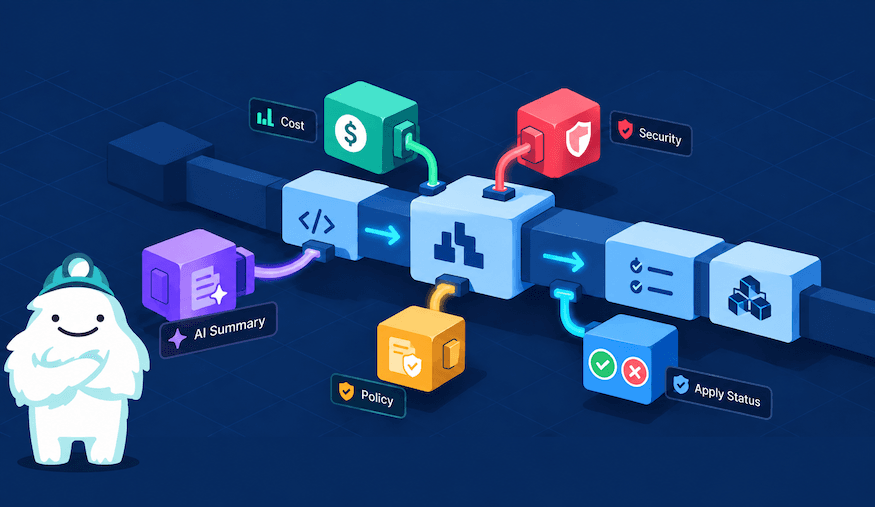
Earlier this summer we released Hooks for Gruntwork Pipelines, a way to plug any tool into your plan and apply runs. We followed up with our first ready-made hook, Infracost cost estimates. Today we're releasing five more: two security scanners, OPA policy checks, AI-written plan summaries, and pass/fail labels on applied PRs. Each one is a single code block and the results show up in pull requests right next to your plan.
This blog recaps how Hooks work, walks you through what the new integrations do, and shows you how to use them. If you run Pipelines on an Enterprise plan and you've wished your PRs told you more about cost, security, or whether that apply actually worked, these are for you and we want to hear what you think.
What are Hooks?
Hooks are how you extend a Gruntwork Pipelines run with your own tooling. They run at two points: after plan and after apply.
Each hook gets context about the run through environment variables: who triggered it, which repo, and what action. After-plan hooks also get the OpenTofu/Terraform plan itself. Anything a hook writes as output shows up in the pull request comment, right alongside the plan or apply summary. Hooks can also use cloud credentials and secrets as needed.
Hooks can pass, warn, or deny. So you decide which checks are informational and which ones block a change. Hook scripts can also live outside your infrastructure repo: point an after_hook at a remote source and Pipelines fetches it before the run, which makes it easy to version and share hooks across repos. The Hooks overview walks through writing one from scratch.
repository {
  after_hook "infracost_estimate" {
    name     = "Infracost Estimate"
    commands = ["plan"]
    execute  = ["pipelines", "hook", "infracost@v0"]
  }
}
Gruntwork-provided hooks let you simplify usage. Provide a name, when it runs, and reference the hook as <name>@<version>.
Gruntwork-provided hooks
Building your own hook is powerful, but it's still work. So we built hooks for the use cases we hear about most. As of today, these are all now available in public beta. They’re built and maintained by Gruntwork, versioned independently of Pipelines, and ready to turn on. The supported use cases are below.
Infracost cost estimates
Released in August, the Infracost hook runs after plan and posts cost deltas and estimated monthly totals for each impacted unit, right in the PR. You can set warning thresholds, so a change that blows past your budget gets flagged during review. You can also block merges that exceed specified absolute or relative thresholds. It pairs well with the new hooks below.
AI Plan Summary
A 400-line plan diff isn’t the easiest thing to review. This hook reads the plan and writes a brief, human-friendly summary of what the change actually does. It adds a one-line headline and calls out risky changes (e.g. destroyed resources, likely downtime, etc) and other special considerations that a reviewer shouldn't miss. It runs with your own AI provider token.
Apply Status Labels
Once a PR merges, the next question is typically whether the apply worked. This hook labels the PR with a green "succeeded" or red "failed" label based on the apply result. Anyone scanning the PR list can see the state of your infrastructure changes at a glance and know when an intervention is required without digging into logs.
Trivy or Checkov security scanning
Trivy (the successor to tfsec) scans your planned changes for security misconfigurations: open security groups, unencrypted storage, overly broad IAM, and more. With this hook, findings show up in your pull request, so issues get fixed before deployment. Optionally, you can block the merge depending on severity.
If you’re a Checkov user, we also provide a hook that scans your infrastructure changes against a large library of security checks and reports findings in your pull requests (similar to Trivy). Pick whichever scanner your security team already trusts.
OPA policy enforcement
This hook uses conftest to evaluate your plan against your own Open Policy Agent (Rego) policies. Policies can be a local directory or a remote git URL, making it simple to manage them centrally across various repos. Enforce the rules that are specific to your org: required tags, approved regions, instance-size limits, cost guardrails. Policy-as-code checks run on every plan without anyone having to remember them. Optionally, you can set enforcement levels to decide when policies should automatically block a merge.
Why this matters
For Gruntwork Pipelines users, these simply mean fewer integrations to build and maintain. You get cost, security, policy, and status signals in the place you already review changes: pull requests.
For platform leads or anyone concerned with governance, these integrations provide common guardrails we hear about most. Security and cost checks run on every change by default, and reviewers approve with more context in less time. And because these are built on the same Hooks framework you have access to, you can extend or replace any of them as your needs grow.
Try them and tell us what you think
These hooks are in public beta, and your feedback decides where they go next. Here's what you can do:
- Pick one. Start with whichever solves a problem you have today.
- Add it to your Pipelines config. Follow the setup steps in the Gruntwork-provided hooks docs.
- Tell us how it went. Let us know what worked, what broke, what's missing. Reach out to your Gruntwork account team or contact support.
Want to build a hook of your own? Let us know what you're building and we're happy to help you get it off the ground. Hooks are available to Gruntwork Enterprise customers. Not on Enterprise yet? Talk to us.



-
No-nonsense DevOps insights
- Expert guidance
-
Latest trends on IaC, automation, and DevOps
-
Real-world best practices