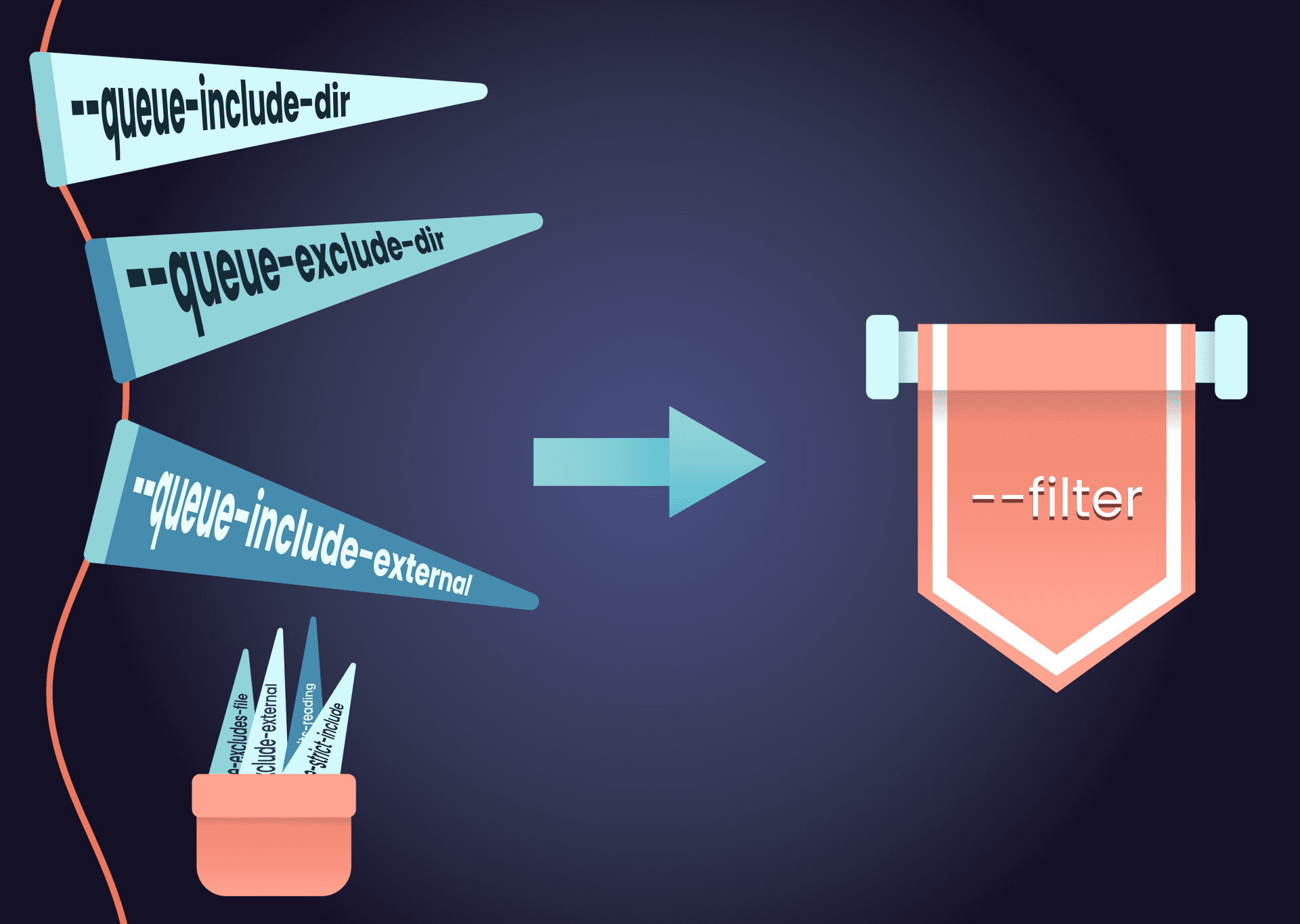
Terragrunt orchestrates runs across many units at once, and on a large estate you almost never want all of them. You want one environment, one service plus its dependencies, or just the units a pull request touched. For years, getting that selection right meant memorizing a pile of special-purpose queue flags:
--queue-include-dir--queue-exclude-dir--queue-include-external--queue-exclude-external--queue-excludes-file--queue-include-units-reading--queue-strict-include
Each flag solved one narrow problem, and combining them correctly was its own skill.
The --filter flag, a highlight of the Terragrunt 1.0 release, replaces all seven of these flags with a single, flexible query language. One flag targets infrastructure by filesystem path, by configuration attributes, by dependency relationships, and by Git diffs, and the expressions compose. If you have not switched yet, this post starts with the simplest filters and builds up to the most advanced ones.
Try filters without running anything
The same flag, with the same syntax, works across:
findandlistfor discoveryrunfor orchestrationhcl fmtandhcl validatefor formatting and validationstack runandstack generatefor stacks
That consistency gives you a safe workflow: dry-run a filter with a discovery command, then hand the identical expression to run.
$ terragrunt find --filter './prod/**'
prod/data/db
prod/services/api
prod/services/web
list takes the same expression and renders the discovered components differently. The --tree flag, for example, shows the selection as a hierarchy, which makes it easier to spot a gap in a selection at a glance:
$ terragrunt list --tree --filter './prod/**'
.
╰── prod
    ├── data
    │   ╰── db
    ╰── services
        ├── api
        ╰── web
When the selection looks right, run it:
terragrunt run --filter './prod/**' -- plan
The rest of this post uses find for brevity, as it’s the easiest way to explore the functionality.
Select by name and path
A bare word is a name expression. It matches any unit or stack whose directory basename matches, anywhere in the tree. You can use glob patterns too:
# Every unit or stack named "web", in any environment
terragrunt find --filter web

# Everything whose name starts with "app"
terragrunt find --filter 'app*'
An expression that starts with ./ or / is interpreted as a path expression instead:
# One specific unit
terragrunt find --filter './prod/services/web'

# Everything under ./prod, recursively
terragrunt find --filter './prod/**'

# Direct children of ./prod/services only
terragrunt find --filter './prod/services/*'
Note the difference between the last two: * does not cross directory boundaries, so you need ** to match nested directories. When you want to be explicit that something is a path expression, wrap it in braces:
# Find the unit at path `./prod`, not any unit named `prod`
terragrunt find --filter '{prod}'
Select by attribute
Attribute expressions use key=value syntax and match on what a unit or stack is rather than where it lives. Five attributes are currently supported:
namematches the directory basename (like thewebexample above)typematchesunitorstackexternalmatches on whether a component is an external dependencyreadingmatches components by the files they readsourcematches theterraformblock source, with glob support
# Only units, or only stacks
terragrunt find --filter 'type=unit'
terragrunt find --filter 'type=stack'

# Explicit name matching (same as a bare word, but unambiguous)
terragrunt find --filter 'name=web'

# Units that read a particular file
terragrunt find --filter 'reading=shared.hcl'

# Units whose terraform source matches a glob
terragrunt find --filter 'source=github.com/acme/**'
The reading= attribute deserves a closer look because it powers change-based selection later. Terragrunt tracks file reads performed by its native HCL functions, so a unit with this configuration:
# live/dev/app/terragrunt.hcl

locals {
  shared = read_terragrunt_config(find_in_parent_folders("shared.hcl"))
}
is matched by reading=shared.hcl automatically. For reads Terragrunt cannot see, such as a file consumed by a script through run_cmd or by OpenTofu/Terraform code, the mark_as_read HCL function records the read explicitly.
The source= attribute matches the source in a unit's terraform block, with glob support, which is handy for questions like "which units consume modules from this organization?" A unit with this configuration:
# live/dev/vpc/terragrunt.hcl

terraform {
  source = "github.com/acme/infrastructure-modules//networking/vpc?ref=v2.1.0"
}
is selected along with every other consumer of the acme organization's modules by:
terragrunt find --filter 'source=github.com/acme/**'
Combine and exclude
Three composition mechanisms cover the cases the old include and exclude flags handled, plus the ones they could not.
Intersection refines results left to right with |:
# Components under ./prod that are units
terragrunt find --filter './prod/** | type=unit'

# Chain as many refinements as you need
terragrunt find --filter './dev/** | type=unit | !name=db'
Negation excludes with a ! prefix, and negated expressions are applied after all positive ones:
# Everything except the legacy directory
terragrunt find --filter '!./legacy/**'
Union merges the results of multiple --filter flags:
terragrunt find --filter './envs/prod/*' --filter './envs/stage/*'
For expressions you reuse constantly, a filters file holds one expression per line (comments start with #), passed with --filters-file. Name it .terragrunt-filters and Terragrunt reads it automatically from the working directory, which is a tidy way to permanently exclude infrastructure that should never run.
Pipelines skips runs against components excluded by .terragrunt-filters files.
Follow the dependency graph
Path and attribute filters match units one at a time, ignoring the dependencies between them. The ... operator follows those dependency relationships, so a selection can bring along what a unit depends on, or what depends on it.
# "service" plus everything it depends on
terragrunt find --filter 'service...'

# "vpc" plus everything that depends on it
terragrunt find --filter '...vpc'

# "db", its dependencies, and its dependents
terragrunt find --filter '...db...'
In practice, the first form deploys a unit whose dependencies may not exist yet, and the second checks the downstream impact of a change to shared infrastructure before you make it:
# Apply service, creating its dependencies first if needed
terragrunt run --all --filter 'service...' -- apply

# Before changing vpc, plan everything that depends on it
terragrunt run --all --filter '...vpc' -- plan
Two modifiers refine traversal. A ^ excludes the target itself, so ...^vpc returns only the dependents of vpc without targeting vpc itself. A numeric depth bounds the walk, so service...1 stops at direct dependencies:
# Dependents of vpc, not including vpc
terragrunt find --filter '...^vpc'

# service and its direct dependencies only
terragrunt find --filter 'service...1'
One note on cost: dependent traversal (...target) requires Terragrunt to parse every unit that could possibly depend on the target, so it does more work than a simple name or path filter. Use it where the answer matters, and bound it with a depth when you only care about immediate neighbors.
Run only what changed
Git expressions are the biggest feature of the new filter syntax. Written between [ and ], they select units affected by the diff between two Git references:
# Components changed between main and HEAD
terragrunt find --filter '[main...HEAD]'

# Shorthand: compare a reference to HEAD
terragrunt find --filter '[main]'

# Tags and relative references work too
terragrunt find --filter '[v1.0.0...v2.0.0]'
terragrunt find --filter '[HEAD~1...HEAD]'
For the most common case, comparing the repository's default branch against HEAD, there is a dedicated shorthand:
terragrunt find --filter-affected
Under the hood, Terragrunt creates a temporary worktree for each reference and diffs them. That design has a useful consequence: a unit that was deleted between the two references still exists in the "from" worktree, so Terragrunt can still operate on it. Combined with run, the behavior follows the diff:
terragrunt run --filter '[main...HEAD]' -- plan
Modified and added units get a plan. Units removed between the references get a plan -destroy. Unchanged units are ignored. With apply, removed units are only actually destroyed if you also pass --filter-allow-destroy, a safeguard against unintended teardown. Git expressions require plan or apply as the command, since deciding whether or not a destroy is required is driven by the Git diff logic.
Because runs happen in temporary worktrees, remote state is strongly recommended with Git expressions; local state paths resolve differently inside a worktree and can lead to mock outputs standing in for real dependency outputs.
Local module support
One gap used to undercut change-based selection: a unit whose terraform { source = ... } pointed at a local module directory did not count the module's files as read, so editing the module would not select the unit. Since Terragrunt 1.1, it does. When a unit's source is a local module, Terragrunt walks the directory and records every *.tf, *.tofu, and *.hcl file (and their .json variants) as read for that unit.
That means a reading= filter selects every consumer of a module:
# Every unit that consumes the shared service module
terragrunt run --all --filter 'reading=./modules/service/**' -- plan
For files read indirectly in bulk, the mark_glob_as_read HCL function marks every file matching a glob as read. The Terragrunt 1.1 release post covers the details.
Replacing the legacy flags
If you have scripts or pipelines built on the queue flags, the mapping is direct:
Nothing breaks if you do not migrate today: the legacy flags are covered by the 1.x backwards compatibility promise, and several of them are aliased to their filter equivalents internally, so you are already running filter expressions without knowing it. The filter syntax is simply more capable, and it is where new filtering features land.
Wrapping up
One flag, four kinds of selection: paths and names for the everyday cases, attributes for what a unit is, graph traversal for what it depends on (and what depends on it), and Git expressions for what changed. Every expression can be dry-run with find and list before it’s used to make changes to live infrastructure, and every expression composes with the others.
The filter documentation covers the full syntax, and the queue-to-filter migration guide walks each legacy flag through its replacement.
Features like the filter flag come out of the work we do supporting large Terragrunt estates. If that's the problem you're solving, check out Terragrunt Scale.



-
No-nonsense DevOps insights
- Expert guidance
-
Latest trends on IaC, automation, and DevOps
-
Real-world best practices