
When a plan or apply fails in Pipelines, debugging usually means opening the CI logs, scrolling past the noise, and tracing the error back to the unit and HCL that caused it. The new AI Error Analysis hook and the error hook capability it’s built on shorten that loop.
AI Error Analysis
The new Gruntwork-provided AI Error Analysis hook offers an explanation in the pull request for every failed run. It includes a one-line summary followed by findings naming the affected units, the issue, and the fix.
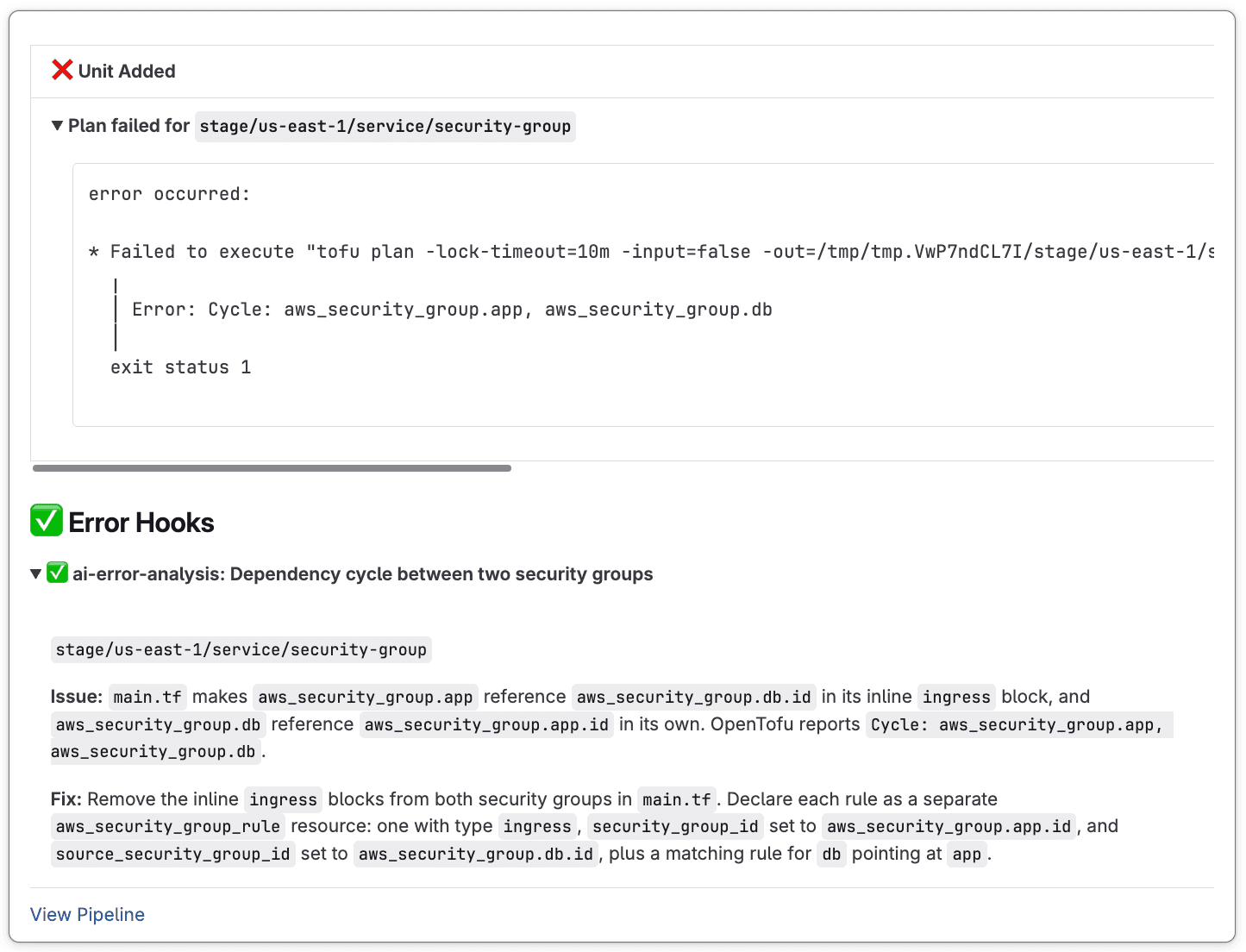
The hook doesn’t just paraphrase the log. It considers each failed unit’s error together with the Terragrunt and OpenTofu/Terraform files for the units in the run to identify the code that caused it. If no unit reports an error, for example when a step fails before Terragrunt runs, it evaluates the output of the failed steps instead. When using the Anthropic provider, it also checks every fix against the Terragrunt docs using the Terragrunt MCP server.
To enable it, add an error_hook block to your repository configuration:
repository {
  error_hook "ai-error-analysis" {
    name      = "AI Error Analysis"
    commands  = ["plan", "apply"]
    on_errors = ["."] # match all errors
    execute   = ["pipelines", "hook", "ai-error-analysis@v0.2"]

    env {
      PIPELINES_HOOK_AI_ERROR_ANALYSIS_PROVIDER = "anthropic"
      PIPELINES_HOOK_AI_ERROR_ANALYSIS_MODEL    = "claude-sonnet-5"
    }
  }
}
You bring your own model. The hook supports anthropic and openrouter as providers. Pass your API key as a secret (PIPELINES_HOOK_AI_ERROR_ANALYSIS_API_KEY), as described in Authentication & Secrets.
Error Hooks
AI Error Analysis runs using the new error_hook capability. An error hook runs only when a plan or apply fails, and only when the failed command’s output matches one of the regular expressions in on_errors. Use ["."] to catch every failure, or target specific errors:
repository {
  error_hook "state_lock" {
    name      = "State Lock Assistance"
    commands  = ["plan", "apply"]
    on_errors = ["Error acquiring the state lock"]
    execute   = [".gruntwork/hooks/post-unlock-instructions.sh"]
  }
}
This makes error hooks a good fit for known failure modes, so you can share a runbook link, page the owning team, or open a ticket in response to failed deploys.
Note how this differs from an after_hook with run_on_error = true: an after hook with that setting will execute on every run regardless of failure, and doesn't receive error logs. An error hook runs only for failed plan or apply (only for the failures it matches), and receives the full logs for analysis. In other words, use error hooks when you intend to run the hook because an error occurred; use after hooks with run_on_error = true when you intend to run a hook despite an error.
Get started
Hooks are available on Pipelines Enterprise as of GitHub v4.31.0 and GitLab v2.27.0.

