NOTE: This guide is specifically about structuring Terragrunt repos for OpenTofu or Terraform. The patterns below rely on Terragrunt features such as hierarchical configuration, inherited settings, generated provider/backend files, and Stacks. They will not work the same way in stock OpenTofu or Terraform unless you add Terragrunt or build equivalent conventions yourself.
Infrastructure repos are prone to fall apart over time, but it almost never happens all at once. Instead, they decay over time because of inconsistent structure, policy, and behaviors. Decisions that felt right on day 1 can become large problems by day 100. A lack of good hygiene and best practices mean the proverbial “day 100” can come at any time. Let’s talk about why.
Every team sets up their repo the same way: a single OpenTofu/Terraform file, a few resources, and often a `terraform.tfvars`. It works, it’s clean, and it feels good. Then you add a second environment. Then a third. Then someone copies the prod folder to create staging, changes two values, and forgets to update a third. Six months later, you're drowning in duplicated configuration, terrified to change anything because you can't tell what's shared and what's diverged.
We’ve seen this pattern across teams running everything from a handful of AWS accounts to hundreds. In most cases, the problem wasn’t tooling. It was structure and setup.
We’ve helped teams unwind this without rewriting everything. The solution is not more scripts or more modules. It’s a repo that makes structure, ownership, and change boundaries obvious. (And don’t worry, this doesn’t have to be manual work.)
In this guide, we’re going to walk you through how a good repository is structured and what good repo hygiene looks like so you can model the behaviors and get rid of the firefighting you’re probably dealing with.
The Failure Modes Nobody Warns You About
Bad repos tend to fall into a few categories. Most teams have hit at least one of these:
- The Copy-Paste Catastrophe
- The Mega-Module Monolith
- The Tribal Knowledge Trap
There are others, though they are less common.
The Copy-Paste Catastrophe
This anti-pattern is the one we alluded to in the intro. It is the most common problem we see IaC teams run into. When you need a new environment, you duplicate an existing folder and tweak a few values. Now you have two copies of everything to keep in sync. Deep inside, you are making a promise to yourself that you know you won’t keep, but this is how the most popular IaC frameworks force you to work. When you fix a bug in one, you have to remember to fix it in the other. Multiply that across five environments and three regions, and you're managing 15 copies of the same VPC configuration.
The insidious part: it works fine at first. You and your team keep the envs in sync … for a while. The pain compounds slowly. By the time it's unbearable, you're looking at thousands of lines of drift between environments that are supposed to be identical.
The Mega-Module Monolith
Some teams think they know better than to copy-paste, so they go the opposite direction. They build one enormous module that deploys everything: networking, compute, databases, DNS, IAM. It takes 45 minutes to plan and requires 200 input variables. Nobody understands all of it. Nobody wants to touch it. And everybody depends on it working.
Until that day comes along when someone needs to change a security group that requires a `plan` against your entire infrastructure. Now your module is a liability.
The Tribal Knowledge Trap
The third failure mode is rooted in operational folklore.
Legend has it that someone who worked here a few years ago wrote a script that has to run before every `terragrunt apply`. Nobody knows why and there’s no reason to question it.
Or there’s that one resource that must be created manually, or that a bootstrap step lives in a wiki page nobody has opened in a year. When you’re dealing with tribal knowledge, the repository takes a back seat to the truth.
If your infrastructure can only be deployed by people who already know the tricks, you do not have reproducible infrastructure.
| Problem | What fixes it |
| Copy-paste environments | Inheritance + stacks |
| Drift between envs | Shared config + version pinning |
| Risky changes | Small state + stacks |
| Hidden behavior | CI/CD-only deploys |
What a Good Infrastructure Repo Optimizes For
A good infrastructure repo is organized so it makes the correct change obvious.
When an engineer opens a repo, they should be able to answer four questions quickly:
- Where does this resource live?
- What config is shared versus environment-specific?
- What depends on what?
- How does this get deployed safely?
That means the repository should optimize for a few practical outcomes:
- Clear location: Every piece of infrastructure has one obvious home.
- Minimal duplication: Shared configuration is defined once, then inherited.
- Small blast radius: Changes affect only the unit they are supposed to affect.
- Reviewable differences: When prod and staging differ, the diff should be visible and intentional.
- Reproducibility: Deployment should come from code and pipeline, not memory.
A well-structured infrastructure repository solves all of these problems. Most teams that scale this pattern also separate live configuration from reusable modules. (We’ll come back to that later.) Here's the structure we recommend, and what we use ourselves:
- Directory structures that mirror your infrastructure topology
- Inheritable configurations that eliminate the need for repo and file duplication
- Tags that are memorable, meaningful, and inheritable
- State files that limit the blast radius of changes (and errors)
- Service definitions using independent, reusable provider configurations
Folder Hierarchy: Account, Region, Resources
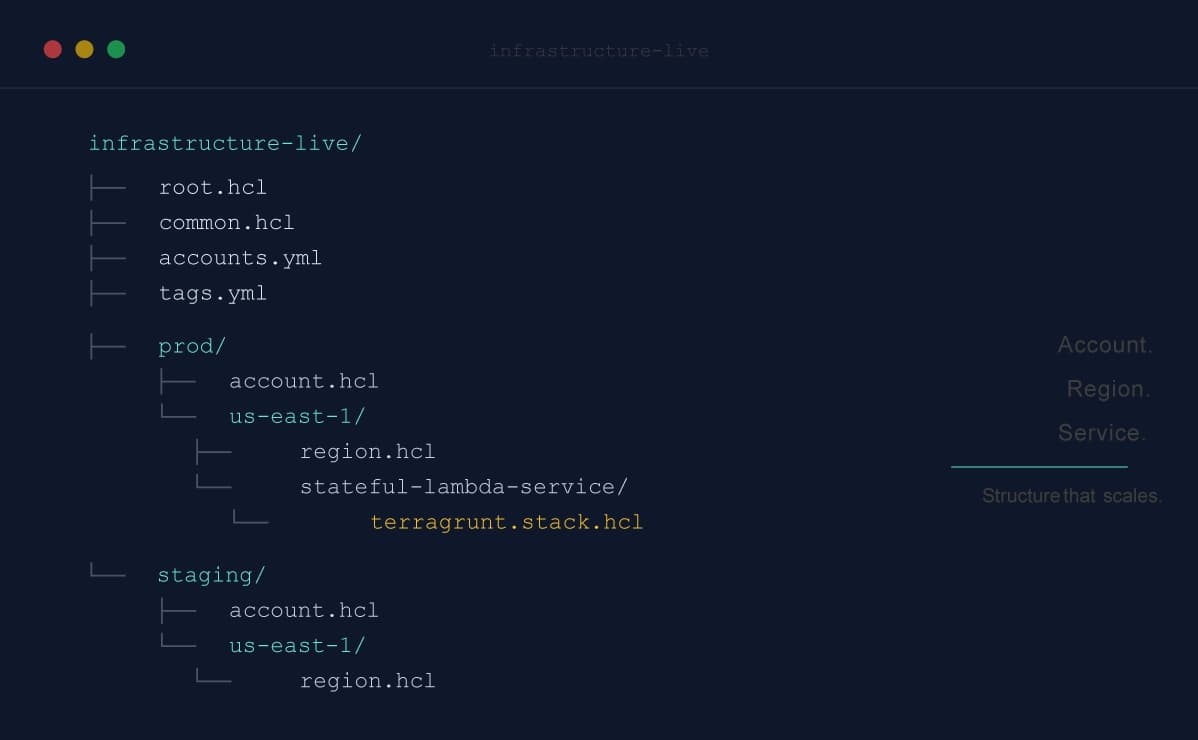
The most reliable Terragrunt pattern we have seen is a hierarchy that mirrors your cloud topology: account, then region, then service or resource grouping. This is a Terragrunt live-repo structure, not a stock Terraform/OpenTofu structure. It depends on Terragrunt’s ability to read configuration from parent folders, inherit shared settings, generate provider/backend files, and coordinate related units with Stacks:
infrastructure-live/
├── root.hcl
├── common.hcl
├── accounts.yml
├── tags.yml
├── staging/
│   ├── account.hcl
│   ├── tags.yml
│   └── us-east-1/
│       ├── region.hcl
│       └── stateful-lambda-service/
│           └── terragrunt.stack.hcl
└── prod/
    ├── account.hcl
    ├── tags.yml
    └── us-east-1/
        ├── region.hcl
        └── stateful-lambda-service/
            └── terragrunt.stack.hcl
This structure solves an important problem immediately: it gives every resource a single obvious location.
If you want the production Lambda service in `us-east-1`, you know where to look. If you want the staging version, you know where to look. New engineers do not need a tour guide just to navigate the repository.
Just as importantly, this hierarchy scales cleanly. New account, add a top-level directory. New region, add a subdirectory. New service, add a new Stack path (we’ll talk about Stacks in a bit). The shape stays consistent as the estate grows.
Configuration Inheritance: Write It Once, Use It Everywhere
Configuration inheritance is where Terragrunt shines. Instead of duplicating configuration across environments, you define it once and let it cascade down through the hierarchy.
The configuration layers build on each other. At the top, a `common.hcl` file defines organization-wide defaults: your naming prefix, account ID mappings, shared CIDR ranges, and default tags.
# common.hcl - Organization-wide defaults
locals {
 name_prefix = "acme-corp"
 default_region = "us-west-2"
 account_info = yamldecode(file("accounts.yml"))
 account_ids = {
 for account_name, info in local.account_info :
 account_name => info.id
 }

 # Centralize naming conventions for shared resources
 config_s3_bucket_name = "${local.name_prefix}-config-logs"
 cloudtrail_s3_bucket_name = "${local.name_prefix}-cloudtrail-logs"

 # Network access controls, defined once, used everywhere
 vpn_ip_allow_list = ["10.0.0.0/8"]
 ssh_ip_allow_list = ["10.0.0.0/8"]

 # Default tags applied to every resource
 default_tags = yamldecode(file("tags.yml"))
}
The `accounts.yml` file gives you a single, human-readable mapping of every account in your organization:
# accounts.yml
prod:
 email: "aws+prod@acme.com"
 id: "account-a"
staging:
 email: "aws+staging@acme.com"
 id: "account-b"
No more hardcoded account IDs scattered across dozens of files. When you add a new account, you add one entry here and every configuration that references `local.account_ids` picks it up automatically.
Below `common.hcl`, each level adds its own context:
# prod/account.hcl - Account-specific values
locals {
 account_name = "prod"
}
# prod/us-east-1/region.hcl - Region-specific values
locals {
 aws_region = "us-east-1"
}
root.hcl ties it all together. It reads the common, account, and region configs, then wires up the provider and backend:
# root.hcl
locals {
 common_vars = read_terragrunt_config(find_in_parent_folders("common.hcl"))
 account_vars = read_terragrunt_config(find_in_parent_folders("account.hcl"))
 region_vars = read_terragrunt_config(find_in_parent_folders("region.hcl"))

 name_prefix = local.common_vars.locals.name_prefix
 account_ids = local.common_vars.locals.account_ids
 account_name = local.account_vars.locals.account_name
 account_id = local.account_ids[local.account_name]
 aws_region = local.region_vars.locals.aws_region
}

generate "provider" {
 path = "provider.tf"
 if_exists = "overwrite_terragrunt"
 contents = <<EOF
provider "aws" {
 region = "${local.aws_region}"
 allowed_account_ids = ["${local.account_id}"]
}
EOF
}
That `allowed_account_ids` line is small, but it matters. That one line prevents you from accidentally applying prod infrastructure to your staging account. It's a small safeguard that has saved many teams from very bad days.
Tags That Flow Downhill
Tags are another place where good intentions usually break down.
If engineers have to remember tagging rules at the resource level, they will miss some. If every module handles tags differently, your governance story gets messy fast.
A better pattern is to define tags at multiple layers and merge them, with the most specific layer winning.
# In root.hcl
locals {
 # Load tags.yml from the current module directory, if it exists
 override_tags = try(yamldecode(file("${get_terragrunt_dir()}/tags.yml")), {})

 # Load tags.yml from the nearest parent directory
 parent_override_tags = try(yamldecode(file(find_in_parent_folders("tags.yml"))), {})

 # Merge: root defaults < account-level overrides < module-level overrides
 tags = merge(merge(local.common_vars.locals.default_tags, local.parent_override_tags), local.override_tags)
}
You can merge as many layers as you need. Here we use three:
# tags.yml (root) - Organization-wide defaults
"acme:Team": "Platform"
# security/tags.yml - Account-level overrides
"acme:Team": "Platform"
"acme:Environment": "Security"
"acme:Application": "Security"
"acme:WorkloadType": "Security"
# security/us-east-1/guardduty/tags.yml - Module-level overrides (if needed)
"acme:Service": "GuardDuty"
Every resource in the security account automatically gets `Team: Platform` from the root, `Environment: Security` from the account, and optionally `Service: GuardDuty` from the module. Nobody has to remember to add them. Nobody can forget.
Terragrunt injects the tags into the AWS provider's `default_tags` block, so they apply to every resource the provider creates:
generate "provider" {
 contents = <<EOF
provider "aws" {
 region = "${local.aws_region}"
 allowed_account_ids = ["${local.account_id}"]
 default_tags {
 tags = ${jsonencode(local.tags)}
 }
}
EOF
}
Tags become a property of the directory structure, not something engineers have to remember. A good tagging strategy lets you define:
- Org-wide defaults at the root
- Account-level overrides in an account directory
- Service-level overrides only where needed
The result is simple: tags become part of the repository structure, not an exercise in human memory.
Separate State, Separate Blast Radius
A clean repo should also reduce blast radius.
That means each unit should have its own state file, lock, and scope of change. Terragrunt can generate that automatically from the directory structure.
remote_state {
 backend = "s3"
 config = {
 encrypt = true
 bucket = "terragrunt-tf-state-${local.account_name}-${local.aws_region}"
 key = "${path_relative_to_include()}/tf.tfstate"
 region = local.aws_region
 use_lockfile = true
 }
}
Now a plan for one Lambda service does not share state with an unrelated database or networking component. That isolation makes both review and recovery much easier.
Stacks: The Modern Approach to DRY Infrastructure
Stacks are where many teams can simplify their live repo the most. If you are still wiring together services through a sprawl of leaf `terragrunt.hcl` files and deep include chains, Terragrunt Stacks are usually a better fit. A stack gives you one file that describes a service and its related infrastructure units together.
Without stacks, most teams end up stitching services together across dozens of `terragrunt.hcl` files and `include` chains. You have to reconstruct a system by reading the repo sideways.
TECHNICAL NOTE: Terragrunt users may know the `_envcommon` pattern: a shared directory of `.hcl` files that each leaf `terragrunt.hcl` includes via `include` blocks with deep merge. Stacks replaces that pattern for defining services, but `_envcommon` still has a role. It's the right place for shared provider `generate` blocks that fall outside `root.hcl`. Your AWS provider lives in `root.hcl`, but units that talk to Datadog, NS1, or other third-party services need their own provider configuration. An `_envcommon` include keeps that wiring in one place instead of duplicating it across every unit that needs it.
What's a Stack?
A Stack is a single `terragrunt.stack.hcl` file that defines a collection of related infrastructure units that deploy together. Think of it as a blueprint for a complete service: the compute, the database, the IAM roles, and the relationships between them, all in one file.
Here's a working example from the open-source terragrunt-infrastructure-live-stacks-example. This stack deploys a stateful Lambda service with a function, a DynamoDB table, and an IAM role:
# prod/us-east-1/stateful-lambda-service/terragrunt.stack.hcl

locals {
 name = "stateful-lambda-service"
}

unit "lambda_service" {
 source = "github.com/gruntwork-io/terragrunt-infrastructure-catalog-example//units/js-lambda-stateful-service?ref=v0.1.0"
 path = "service"

 values = {
 name = local.name
 runtime = "nodejs22.x"
 handler = "index.handler"
 source_dir = "./src"
 zip_file = "handler.zip"
 memory = 128
 timeout = 3
 role_path = "../roles/lambda-iam-role-to-dynamodb"
 dynamodb_table_path = "../db"
 }
}

unit "db" {
 source = "github.com/gruntwork-io/terragrunt-infrastructure-catalog-example//units/dynamodb-table?ref=v0.1.0"
 path = "db"

 values = {
 name = "${local.name}-db"
 hash_key = "Id"
 hash_key_type = "S"
 }
}

unit "role" {
 source = "github.com/gruntwork-io/terragrunt-infrastructure-catalog-example//units/lambda-iam-role-to-dynamodb?ref=v0.1.0"
 path = "roles/lambda-iam-role-to-dynamodb"

 values = {
 name = "${local.name}-role"
 dynamodb_table_path = "../../db"
 }
}
The exact unit mix will vary, but the structural benefit stays the same. One stack file shows what the service is, what units it includes, and how those units connect.
That is a much better review surface than hunting through a maze of directories to reconstruct one deployable system.
The Live/Catalog Separation (Two Repos to Rule Them All)
Stacks work best with a clean separation between two repositories. The advantage of the second repo is that you can version and tag the catalog independently from what’s deployed live:
- infrastructure-live — Where your stacks live. Contains the specific configuration for each account, region, and service. This is the repo we've been discussing.
- infrastructure-catalog — Where your reusable unit and module definitions live. Contains the general patterns that stacks consume.
Each `unit` block in a stack file points to a definition in the catalog via the `source` field. The catalog defines how to deploy a Lambda function. The stack defines this specific Lambda function with these specific settings.
This separation means your platform team maintains the catalog (security defaults, compliance baselines, best practices baked in) while application teams consume it through stacks (picking modules, setting their inputs, and deploying via PR).
Same Stack, Different Environments
Compare the two environment stacks side by side. Here's what actually differs between staging and prod for the same service:
# staging stack
locals {
 name = "stateful-lambda-service-dev"
}

# prod stack
locals {
 name = "stateful-lambda-service"
}
That's it. The unit definitions, the module sources, the dependency graph: all identical. The only difference is the naming. When you need to diverge (say, smaller instance sizes in dev or fewer replicas in staging), you change the specific `values` in that environment's stack file. The diff is obvious and reviewable.
Want to see Stacks in action? Lorelei Rupp, Senior Principal DevOps Engineer at Imprivata, shared her team's results after adopting Terragrunt Stacks: “By adopting Terragrunt Stacks, we eliminated nearly 20,000 lines of custom IaC and reduced environment plan times from two hours to just eight minutes using the Terragrunt cache provider. Less code, faster feedback loops — unlocking a whole new level of velocity for our team.”
Practices That Scale
Beyond directory structure, several practices make this approach sustainable at scale.
Don’t Use `main` or `latest` — Pin Your Module Versions
Every unit should pin its module version:
unit "db" {
 source = "github.com/gruntwork-io/terragrunt-infrastructure-catalog-example//units/dynamodb-table?ref=v0.1.0"
 values = {
 # ...
 }
}
Never point at `main`. Never use `latest`. The `?ref=` tag in the `source` URL pins the catalog unit version; the `version` in `values` pins the underlying OpenTofu module. When a new catalog version is available, you update both refs in the stack file, open a PR, review the plan output, and merge. Controlled, auditable, reversible.
CI/CD as the Only Path to Production
Your pipeline should be the exclusive mechanism for deploying to production. No exceptions. In practice, this means:
- PRs trigger `terragrunt plan` so reviewers see the actual changes
- Merges to `main` trigger `terragrunt apply` with OIDC authentication
- No human has write access to production accounts outside the pipeline
- Separate IAM roles for plan (read-only) and apply (write) operations
Your Git history becomes the audit trail. Every infrastructure change is a PR. Every PR has a plan output. Every merge has an apply log. When an auditor asks who changed production, you should not be checking Slack or asking around. You should be pointing to a pull request.
Tool Version Pinning
Pin your OpenTofu/Terraform and Terragrunt versions in the repo itself. [mise](https://mise.jdx.dev/) handles this well. It manages tool versions per-project and installs them automatically:
# mise.toml
[tools]
opentofu = "1.11.6"
terragrunt = "1.0.3"
When someone clones the repo and runs `mise install`, they get the exact versions the team uses. No more "it works on my machine" debugging sessions caused by version drift.
How to Start Without a Big Rewrite
You do not have to adopt all of this at once. Start with the changes that give you the fastest reduction in chaos:
1. Add a `root.hcl` and centralize provider and remote state configuration.
2. Pin every module and catalog version.
3. Pick one heavily duplicated service and model it as a `terragrunt.stack.hcl`.
4. Lock production deployment behind CI/CD.
5. Split reusable building blocks into an infrastructure catalog.
Those changes are incremental. They are easy to review. And they move the repo toward a model that scales without turning into a pile of exceptions.
If you want a working reference, start with the open-source `terragrunt-infrastructure-live-stacks-example` and its companion `terragrunt-infrastructure-catalog-example`. They show the patterns above in a form you can actually inspect and adapt.
Because the alternative is the one too many teams already know: duplicated directories, unexplained drift, and the uneasy feeling that one command in the wrong place could ruin your afternoon.



-
No-nonsense DevOps insights
- Expert guidance
-
Latest trends on IaC, automation, and DevOps
-
Real-world best practices